

How to use a coupon
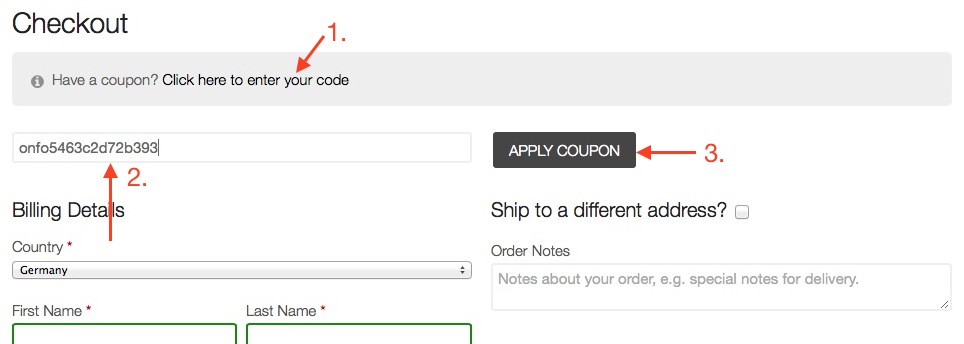
Go to Checkout.
1. Click on: “Click here to enter your code”.
2. Enter the code we have submitted.
3. Click “Apply Coupon”.
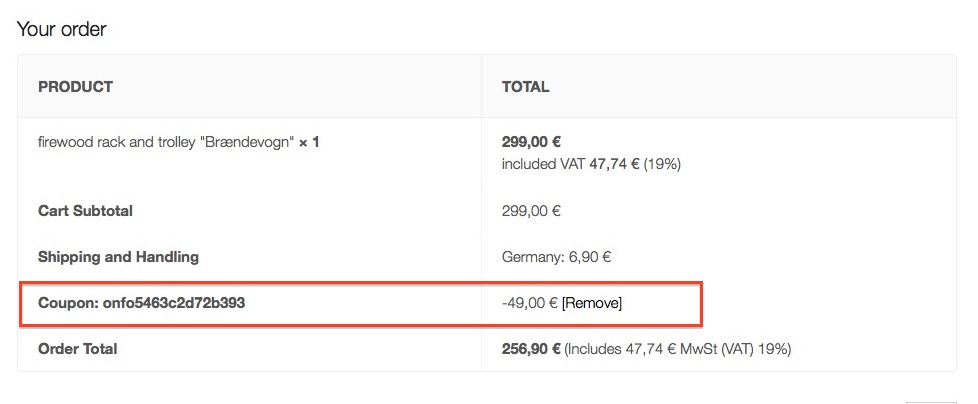
After applying your discount is shown here:
Go to Checkout.
1. Click on: “Click here to enter your code”.
2. Enter the code we have submitted.
3. Click “Apply Coupon”.
After applying your discount is shown here:
When you visit our website, it may store information through your browser from specific services, usually in the form of cookies. Here you can change your Privacy preferences. It is worth noting that blocking some types of cookies may impact your experience on our website and the services we are able to offer.
[matomo_opt_out]
Go to Privacy Policy Page